배경
Feel-Archive 프로젝트의 타임캡슐 기능을 개발하던 중 다음과 같은 플로우로 진행 중이었다.
1. 스케줄러 실행 (매분 단위로 스케줄러 발생)
2. 타임캡슐 조회
3. 타임캡슐 오픈
4. 타임캡슐 알림(SSE, 이메일)
이 4가지 작업이 동기로 진행되면 SMTP 외부 서버를 사용하는 이메일 알림에서 작업이 오래 걸릴 수 있다.
테스트로 이메일 알림을 보낼 때 SMTP 서버 장애 등의 이유로 30초 이상 걸렸다고 해보자.
또한 이메일 발송 실패 시에도 재발송을 위한 로그를 반드시 남겨야 하는데, 트랜잭션 롤백 문제도 함께 다뤄야 한다. 내용이 길어질 수 있어 2개 글로 나눠 작성하겠다.
스케줄러 코드
@Slf4j
@Component
@RequiredArgsConstructor
public class TimeCapsuleOpenScheduler {

  @Value("${app.time-capsule.batch-size}")
  private int batchSize;

  private final TimeCapsuleService timeCapsuleService;

  @Scheduled(cron = "0 * * * * *")
  public void notificationTimeCapsule() {
    log.info("=== 타임캡슐 스케줄러 시작 - {} ===", LocalDateTime.now());

    Slice<TimeCapsule> timeCapsules = timeCapsuleService.openPendingCapsules(
        LocalDateTime.now(),
        PageRequest.of(0, batchSize)
    );
    for (TimeCapsule capsule : timeCapsules) {
      log.info("타임캡슐 오픈 시작 - ID: {}", capsule.getId());
      try {
        timeCapsuleService.openOneCapsule(capsule.getId());
        log.info("타임캡슐 오픈 완료 - ID: {}", capsule.getId());
      } catch (FeelArchiveException e) {
        log.warn("타임캡슐 오픈 실패 (ID: {}): {}", capsule.getId(), e.getMessage());
      } catch (Exception e) {
        log.error("알 수 없는 오류 발생 (ID: {})", capsule.getId(), e);
      }
    }

    log.info("=== 타임캡슐 스케줄러 종료 ===");
  }
}
openOneCapsule()
  @Transactional
  public void openOneCapsule(Long capsuleId) {
    TimeCapsule capsule = getByIdWithUser(capsuleId);

    capsule.updateStatus(CapsuleStatus.OPENED);

    eventPublisher.publishEvent(new TimeCapsuleOpenedEvent(
        capsule.getId(),
        capsule.getUser().getId(),
        capsule.getUser().getName(),
        capsule.getUser().getEmail().getEmail(),
        capsule.getCreatedAt(),
        capsule.getOpenAt()
    ));
  }
타임캡슐 오픈 이벤트 리스너
@Slf4j
@Component
@RequiredArgsConstructor
public class TimeCapsuleEventListener {

  private final NotificationService notificationService;

  @Async("timeCapsuleNotificationExecutor")
  @TransactionalEventListener(phase = TransactionPhase.AFTER_COMMIT)
  public void notificationTimeCapsule(TimeCapsuleOpenedEvent event) {
    log.info("타임캡슐 오픈 알림 이벤트 수신 - capsuleId: {}, userId: {}", event.timeCapsuleId(), event.userId());

    try {
      log.info("알림 발송 시작 - userId: {}", event.userId());
      notificationService.sendTimeCapsuleNotification(event);
      log.info("알림 발송 완료 - userId: {}", event.userId());
    } catch (Exception e) {
      log.error("알림 발송 실패 = ", e);
    }
  }
알림 전송 로직
  @Transactional
  public void sendTimeCapsuleNotification(TimeCapsuleOpenedEvent event)
      throws MessagingException, InterruptedException {
    User user = userReader.getById(event.userId());

    Notification notification = Notification.builder()
        .user(user)
        .type(NotificationType.TIME_CAPSULE)
        .title("타임캡슐이 열렸습니다!")
        .content(generateNotificationContent(event.createAt(), event.openedAt()))
        .relatedId(event.timeCapsuleId())
        .build();

    notificationRepository.save(notification);

    try {
      sseService.send(user.getId(), "time-capsule", new NotificationEvent(
          notification.getId(),
          NotificationType.TIME_CAPSULE.name(),
          notification.getTitle(),
          notification.getContent(),
          notification.getRelatedId(),
          notification.getCreatedAt()
      ));
    } catch (Exception e) {
      log.error("SSE 발송 실패 - userId: {}", user.getId(), e);
    }

    if (user.isEmailNotificationEnabled()) {
      EmailLog log = create(event);
      Thread.sleep(70000);  // 1분 10초 블로킹
      //mailService.sendTimeCapsuleNotificationMail(event, log);
    }
  }
이메일 전송 메서드
  @Retryable(
      retryFor = MessagingException.class,
      maxAttempts = 3,
      backoff = @Backoff(delay = 1000, multiplier = 2)
  )
  @Transactional(propagation = Propagation.REQUIRES_NEW, noRollbackFor = {Exception.class})
  public void sendTimeCapsuleNotificationMail(TimeCapsuleOpenedEvent event, EmailLog log)
      throws MessagingException {
    MimeMessage message = mailSender.createMimeMessage();

    try {
      MimeMessageHelper messageHelper = new MimeMessageHelper(message);

      String timeAgoText = String.valueOf(ChronoUnit.DAYS.between(event.createAt(), event.openedAt()));
      String viewUrl = String.format("%s/timecapsule/%d", baseUrl, event.timeCapsuleId());

      messageHelper.setTo(event.email());
      messageHelper.setSubject("[필아카이브] 타임캡슐이 열렸습니다!");

      Context context = new Context();
      context.setVariable("timeAgoText", timeAgoText);
      context.setVariable("userName", event.name());
      context.setVariable("createdAt", DateUtils.formatToDateTime(event.createAt()));
      context.setVariable("openedAt", DateUtils.formatToDateTime(event.openedAt()));
      context.setVariable("viewUrl", viewUrl);

      String htmlContent = templateEngine.process("mail/time-capsule-noti", context);
      messageHelper.setText(htmlContent, true);

      mailSender.send(message);
      log.markAsSuccess();
    } catch (MessagingException e) {
      log.markAsFail(e.getMessage());
      log.incrementRetryCount();
      throw e;
    } catch (Exception e) {
      log.markAsFail(e.getMessage());
      throw new RuntimeException(e);
    } finally {
      emailLogRepository.save(log);
    }
  }
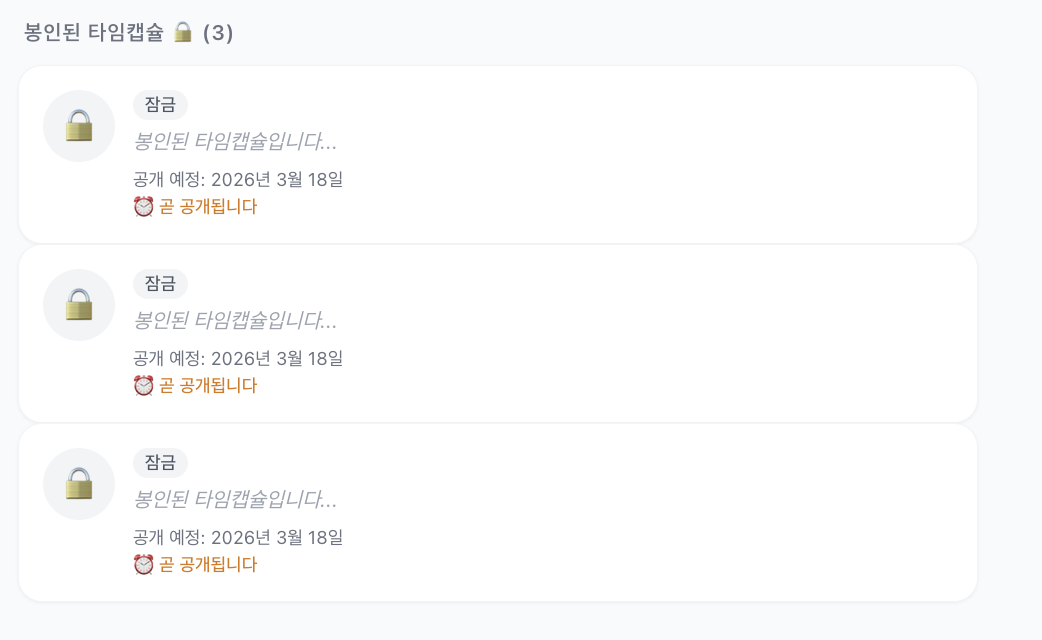
동일 시각에 열리는 타임캡슐 2개(11시13분 오픈), 그리고 1분뒤에 열리는 타임캡슐 1개(11시14분 오픈)를 작성했다. @Async 어노테이션을 추석처리 후 동기 방식으로 실행해보면 터미널에 남는 로그를 보면 다음과 같다.
2026-03-18 11:13:00 [scheduling-1] INFO  c.f.a.t.s.TimeCapsuleOpenScheduler - === 타임캡슐 스케줄러 시작 - 2026-03-18T11:13:00.011412 ===
2026-03-18 11:13:00 [scheduling-1] INFO  c.f.a.t.s.TimeCapsuleOpenScheduler - 타임캡슐 오픈 시작 - ID: 24
2026-03-18 11:13:00 [scheduling-1] INFO  c.f.a.t.h.TimeCapsuleEventListener - 타임캡슐 오픈 알림 이벤트 수신 - capsuleId: 24, userId: 3
2026-03-18 11:13:00 [scheduling-1] INFO  c.f.a.t.h.TimeCapsuleEventListener - 알림 발송 시작 - userId: 3
2026-03-18 11:14:10 [scheduling-1] INFO  c.f.a.t.h.TimeCapsuleEventListener - 알림 발송 완료 - userId: 3
2026-03-18 11:14:10 [scheduling-1] INFO  c.f.a.t.s.TimeCapsuleOpenScheduler - 타임캡슐 오픈 완료 - ID: 24
2026-03-18 11:14:10 [scheduling-1] INFO  c.f.a.t.s.TimeCapsuleOpenScheduler - 타임캡슐 오픈 시작 - ID: 25
2026-03-18 11:14:10 [scheduling-1] INFO  c.f.a.t.h.TimeCapsuleEventListener - 타임캡슐 오픈 알림 이벤트 수신 - capsuleId: 25, userId: 3
2026-03-18 11:14:10 [scheduling-1] INFO  c.f.a.t.h.TimeCapsuleEventListener - 알림 발송 시작 - userId: 3
2026-03-18 11:15:20 [scheduling-1] INFO  c.f.a.t.h.TimeCapsuleEventListener - 알림 발송 완료 - userId: 3
2026-03-18 11:15:20 [scheduling-1] INFO  c.f.a.t.s.TimeCapsuleOpenScheduler - 타임캡슐 오픈 완료 - ID: 25
2026-03-18 11:15:20 [scheduling-1] INFO  c.f.a.t.s.TimeCapsuleOpenScheduler - === 타임캡슐 스케줄러 종료 ===
2026-03-18 11:16:00 [scheduling-1] INFO  c.f.a.t.s.TimeCapsuleOpenScheduler - === 타임캡슐 스케줄러 시작 - 2026-03-18T11:16:00.008330 ===
2026-03-18 11:16:00 [scheduling-1] INFO  c.f.a.t.s.TimeCapsuleOpenScheduler - 타임캡슐 오픈 시작 - ID: 26
2026-03-18 11:16:00 [scheduling-1] INFO  c.f.a.t.h.TimeCapsuleEventListener - 타임캡슐 오픈 알림 이벤트 수신 - capsuleId: 26, userId: 3
2026-03-18 11:16:00 [scheduling-1] INFO  c.f.a.t.h.TimeCapsuleEventListener - 알림 발송 시작 - userId: 3
2026-03-18 11:17:10 [scheduling-1] INFO  c.f.a.t.h.TimeCapsuleEventListener - 알림 발송 완료 - userId: 3
2026-03-18 11:17:10 [scheduling-1] INFO  c.f.a.t.s.TimeCapsuleOpenScheduler - 타임캡슐 오픈 완료 - ID: 26
2026-03-18 11:17:10 [scheduling-1] INFO  c.f.a.t.s.TimeCapsuleOpenScheduler - === 타임캡슐 스케줄러 종료 ===

로그를 보면 총 3가지 문제를 확인할 수 있다.
1. 순차 처리로 인한 지연
- 25번 타임캡슐이 24번 처리가 끝날 때까지 대기 (10초 지연)
- N개의 타임캡슐이 있으면 마지막 사용자는 N×70초 후 알림 받음
2. 스케줄러 스킵
- 11:14, 11:15 스케줄러 실행되지 않음
- 이전 작업이 1분 넘게 소요되면 다음 스케줄러가 스킵됨
3. 타임캡슐 지연 오픈
- 25번: 11:13에 열렸어야 하지만 11:14:10에 오픈 (1분 10초 지연) -> 이전 타임캡슐 지연시간에 따른 영향
- 26번: 11:14에 열렸어야 하지만 11:16:00에 오픈 (2분 지연)
- SMTP 장애 시 지연은 더 심각해질 수 있음
그래서 비동기로 실행시켜야하는 것이다.
스케줄러의 독립성 보장과 외부 서버를 사용하는 이메일 같은 작업의 영향을 최소화하기 위해서다.
비동기로 실행했을 때 로그는 다음과 같다.
2026-03-18 11:32:00 [scheduling-1] INFO  c.f.a.t.s.TimeCapsuleOpenScheduler - === 타임캡슐 스케줄러 시작 - 2026-03-18T11:32:00.006909 ===
2026-03-18 11:32:00 [scheduling-1] INFO  c.f.a.t.s.TimeCapsuleOpenScheduler - 타임캡슐 오픈 시작 - ID: 30
2026-03-18 11:32:00 [scheduling-1] INFO  c.f.a.t.s.TimeCapsuleOpenScheduler - 타임캡슐 오픈 완료 - ID: 30
2026-03-18 11:32:00 [time-capsule-3] INFO  c.f.a.t.h.TimeCapsuleEventListener - 타임캡슐 오픈 알림 이벤트 수신 - capsuleId: 30, userId: 3
2026-03-18 11:32:00 [scheduling-1] INFO  c.f.a.t.s.TimeCapsuleOpenScheduler - 타임캡슐 오픈 시작 - ID: 31
2026-03-18 11:32:00 [time-capsule-3] INFO  c.f.a.t.h.TimeCapsuleEventListener - 알림 발송 시작 - userId: 3
2026-03-18 11:32:00 [scheduling-1] INFO  c.f.a.t.s.TimeCapsuleOpenScheduler - 타임캡슐 오픈 완료 - ID: 31
2026-03-18 11:32:00 [time-capsule-4] INFO  c.f.a.t.h.TimeCapsuleEventListener - 타임캡슐 오픈 알림 이벤트 수신 - capsuleId: 31, userId: 3
2026-03-18 11:32:00 [time-capsule-4] INFO  c.f.a.t.h.TimeCapsuleEventListener - 알림 발송 시작 - userId: 3
2026-03-18 11:32:00 [scheduling-1] INFO  c.f.a.t.s.TimeCapsuleOpenScheduler - === 타임캡슐 스케줄러 종료 ===
2026-03-18 11:33:00 [scheduling-1] INFO  c.f.a.t.s.TimeCapsuleOpenScheduler - === 타임캡슐 스케줄러 시작 - 2026-03-18T11:33:00.006101 ===
2026-03-18 11:33:00 [scheduling-1] INFO  c.f.a.t.s.TimeCapsuleOpenScheduler - 타임캡슐 오픈 시작 - ID: 32
2026-03-18 11:33:00 [time-capsule-5] INFO  c.f.a.t.h.TimeCapsuleEventListener - 타임캡슐 오픈 알림 이벤트 수신 - capsuleId: 32, userId: 3
2026-03-18 11:33:00 [time-capsule-5] INFO  c.f.a.t.h.TimeCapsuleEventListener - 알림 발송 시작 - userId: 3
2026-03-18 11:33:00 [scheduling-1] INFO  c.f.a.t.s.TimeCapsuleOpenScheduler - 타임캡슐 오픈 완료 - ID: 32
2026-03-18 11:33:00 [scheduling-1] INFO  c.f.a.t.s.TimeCapsuleOpenScheduler - === 타임캡슐 스케줄러 종료 ===
2026-03-18 11:33:10 [time-capsule-3] INFO  c.f.a.t.h.TimeCapsuleEventListener - 알림 발송 완료 - userId: 3
2026-03-18 11:33:10 [time-capsule-4] INFO  c.f.a.t.h.TimeCapsuleEventListener - 알림 발송 완료 - userId: 3
2026-03-18 11:34:00 [scheduling-1] INFO  c.f.a.t.s.TimeCapsuleOpenScheduler - === 타임캡슐 스케줄러 시작 - 2026-03-18T11:34:00.014471 ===
2026-03-18 11:34:00 [scheduling-1] INFO  c.f.a.t.s.TimeCapsuleOpenScheduler - === 타임캡슐 스케줄러 종료 ===
2026-03-18 11:34:10 [time-capsule-5] INFO  c.f.a.t.h.TimeCapsuleEventListener - 알림 발송 완료 - userId: 3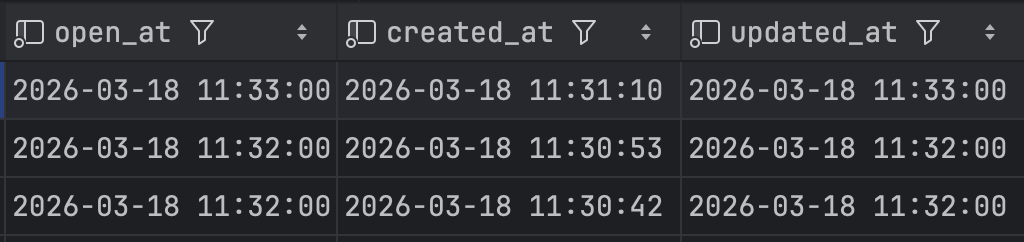
타임캡슐 OPEN과 알림 발송 시작이 동시에 이루어졌으며, 알림을 실제로 전송하는 로직은 백그라운드 작업으로 설정함으로써 외부 SMTP 장애가 비지니스 로직에 영향을 주지 않도록 했다.
하지만, 비동기 스레드로 처리하도록했다고 다 끝난게 아닌 새로운 관리 포인트가 있다.
너무 적은 스레드 풀로 설정하면 SMTP 장애로 인해 스레드를 오래 점유할 수 있다. 남은 스레드가 없으면 다른 타임캡슐 알림 작업들이 큐에 대기하게 되고, 결과적으로 알림이 타임캡슐 오픈 시간보다 늦게 전달될 수 있다.
그래서 SMTP 타임아웃을 설정하여 스레드 점유 시간을 제한하고, 스레드 풀 크기는 실 운영 환경에서 모니터링하며 조절할 예정이다.
다음 글에서는 트랜잭션 롤백 문제를 다룰 예정입니다.
'Feel-Archive' 카테고리의 다른 글
| [Feel-Archive] 성능 테스트(1) - 1GB 메모리에서 모니터링 구축하기 (0) | 2026.03.12 |
|---|---|
| [Feel-Archive] N+1 감지 시스템 구축기 (0) | 2026.03.12 |
| [Feel-Archive] 타임캡슐 알림이 9시간 늦게 온다 (0) | 2026.03.08 |

